

- Zebra barcode printers are known for reliability, but like any device, they can occasionally face issues such as printing errors, connectivity problems, faded labels, or calibration faults. This complete troubleshooting guide helps you diagnose and fix common Zebra printer problems quickly.
Common Zebra Printer Problems & Solutions


4
1. Printer Not Printing
Possible Causes
- Printer paused
- Wrong driver installed
- Label not detected
- Print queue stuck
Fix
- Press FEED button once
- Restart printer and system
- Reinstall correct Zebra driver
- Clear print queue from Windows
2. Labels Feeding but Blank Print
Reason
- Direct thermal label used in transfer mode
- Ribbon missing or installed wrong
- Printhead dirty
Solution
- Check printing mode setting
- Reinstall ribbon correctly
- Clean printhead with isopropyl alcohol wipe
3. Faded or Light Printing
Causes
- Low darkness setting
- Worn printhead
- Poor quality ribbon
- Low heat configuration
Fix
- Increase darkness in driver settings
- Replace ribbon
- Replace printhead if worn
- Use resin ribbon for durable prints
4. Printer Skipping Labels
Reason
- Sensor not calibrated
- Wrong label size set
- Gap sensor dirty
Solution
- Run media calibration
- Check label size settings
- Clean sensor area
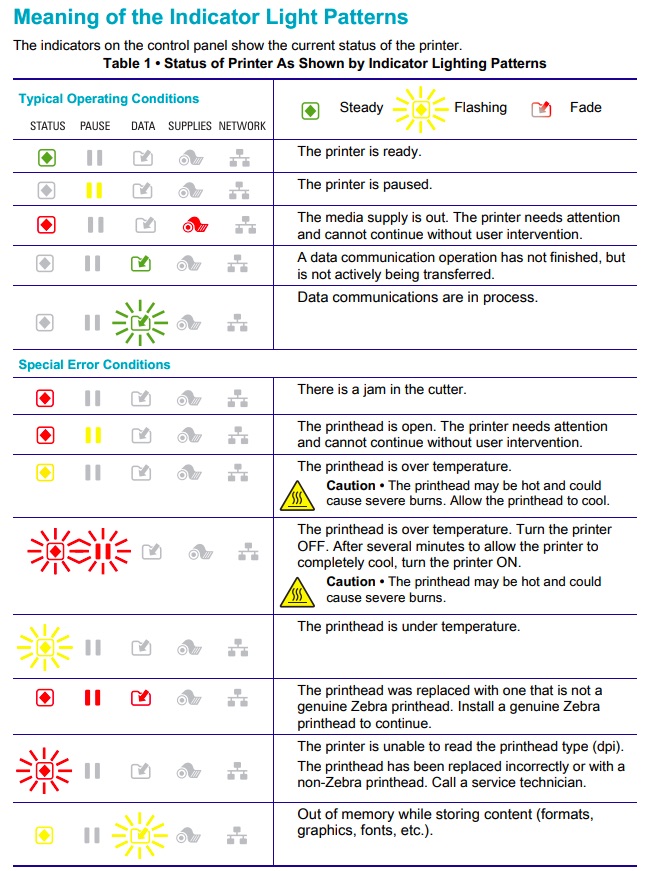
5. Red Light Blinking Error
Common meaning:
- Paper out
- Ribbon out
- Cover open
- Head overheated
Fix Checklist
- Reload labels
- Close cover properly
- Allow printer to cool
- Reset printer
6. Printer Not Detected by Computer
Troubleshooting Steps
- Check USB or network cable
- Reinstall driver
- Try different USB port
- Check printer IP address
- Restart spooler service
How to Calibrate Zebra Printer

4
Steps
- Turn printer off
- Hold FEED button
- Turn printer on while holding
- Release when light flashes
- Printer auto-calibrates labels
Maintenance Tips to Prevent Issues
- Clean printhead weekly
- Use genuine ribbons and labels
- Avoid dust near printer
- Store labels in dry place
- Replace worn rollers
When to Call Technical Support
Contact support if:
- Printer not powering on
- Continuous error light
- Mechanical noise
- Firmware errors
- Burnt printhead line
Why Choose Mindware for Zebra Printer Support
Mindware provides complete Zebra printer support and barcode solutions for businesses across India.
What You Get
- Free installation
- Dedicated in-house support team
- 1 year free technical support
- Genuine Zebra spare parts
- Labels and ribbons manufacturing
- Barcode software setup
- End-to-end printing solutions
This means you don’t need multiple vendors — Mindware handles everything.
Contact Mindware Technical Team
Phone: +91 9810822688 / +91 9717122688
Email: gm@indianbarcode.com
Website: https://shop.tscprintersindia.com
Final Advice
Most Zebra printer issues are caused by:
- incorrect settings
- poor consumables
- calibration errors
Fixing these usually resolves 90% of problems instantly. Proper maintenance and correct configuration ensure your printer runs smoothly for years.